
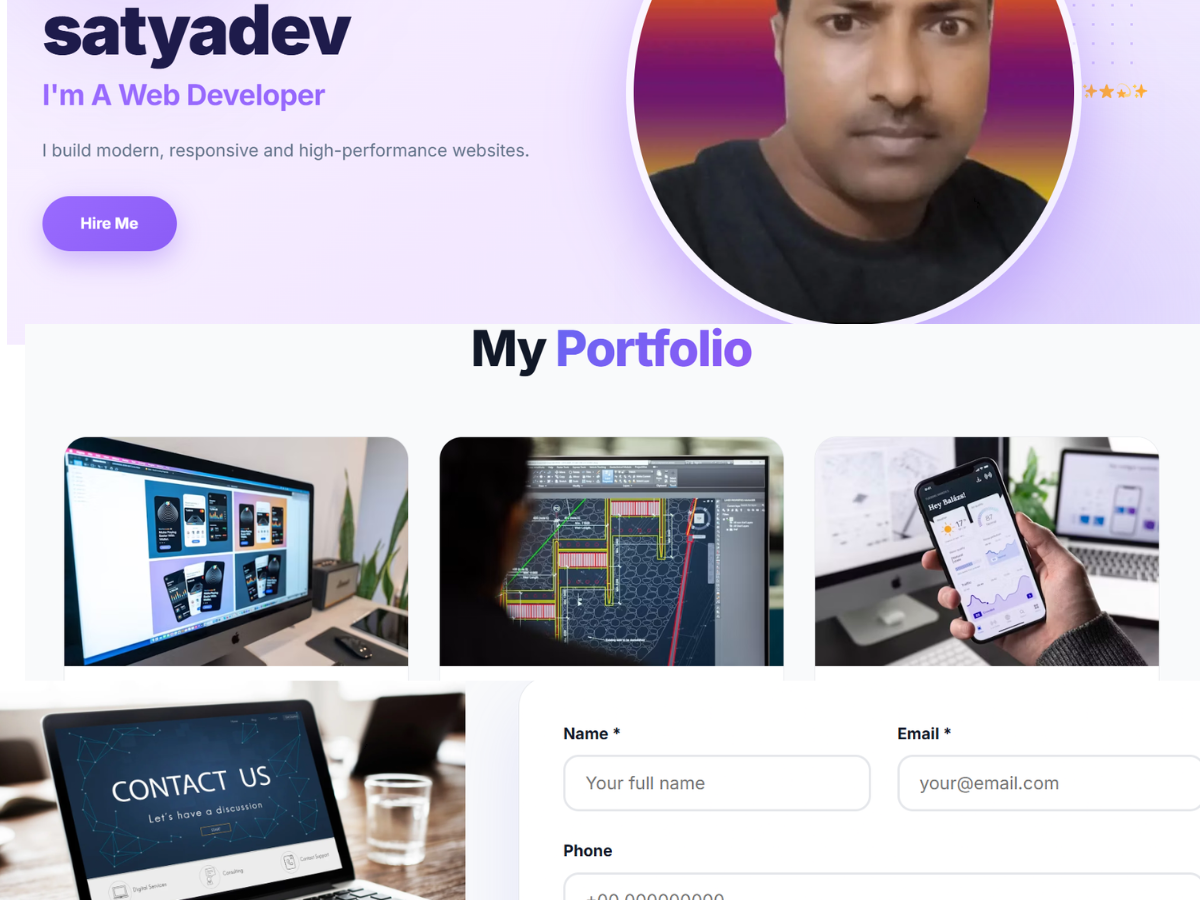
Are you looking for a modern and professional way to showcase your programming skills, development projects, and technical expertise? The Pro Developer Portfolio WordPress Theme is a great option to explore if you want to build an impressive online portfolio and establish a strong professional presence.
In today’s digital world, having a personal portfolio website is important for developers, programmers, freelancers, software engineers, and creative professionals. A well-designed portfolio allows you to present your experience, highlight your best projects, and help potential clients or employers understand your capabilities.
With WordPress, you can create a professional website that reflects your personality, skills, and career goals. A suitable developer portfolio theme provides a design foundation for organizing your content and presenting your work in a clean and engaging way.
Explore the live demo: Pro Developer Portfolio WordPress Theme
Whether you are an experienced web developer or a beginner building your first portfolio, a dedicated website can help you showcase your work and grow your professional identity.
What Is the Pro Developer Portfolio WordPress Theme?
The Pro Developer Portfolio WordPress Theme is designed for professionals who want to present their work and technical expertise through a personal website. A developer portfolio typically includes an introduction, technical skills, completed projects, work experience, services, and contact information.
Instead of depending entirely on social media profiles or third-party portfolio platforms, you can create your own website with WordPress and maintain greater control over your professional presentation.
A personal portfolio website can function as your digital resume, project showcase, professional profile, and online contact point.
This type of theme is suitable for various professionals, including:
- Web developers
- WordPress developers
- Front-end developers
- Back-end developers
- Full-stack developers
- Software engineers
- PHP developers
- Freelance programmers
- UI/UX designers
- Technology consultants
You can explore the design and layout through the Pro Developer Portfolio WordPress Theme demo before deciding whether it suits your needs.
Why Do Developers Need a Portfolio Website?
A portfolio website allows developers to demonstrate practical experience beyond a traditional resume. Potential clients and employers often want to see examples of your work, understand your technical skills, and learn about the projects you have completed.
A personal website brings this information together in one accessible location.
Showcase Your Development Projects
Your projects demonstrate how you apply your technical knowledge to real-world problems. A dedicated portfolio section can help you display websites, applications, software tools, and other development work.
For each project, you can include a title, description, technologies used, screenshots, and a link to the live project or source code.
Providing context about your contribution makes your portfolio more informative and professional.
Build Your Personal Brand
A professional website helps you communicate your unique identity as a developer. You can introduce yourself, explain your areas of specialization, and highlight the experience that makes your work valuable.
Consistent design and clear content can help visitors remember your professional identity.
Attract Potential Clients
Freelance developers need an effective way to explain their services and demonstrate their capabilities. A portfolio website can showcase previous work, describe the services you provide, and encourage interested visitors to contact you.
This creates a convenient starting point for building professional relationships and receiving project inquiries.
Improve Your Job Opportunities
A portfolio gives recruiters and hiring managers an opportunity to explore your practical skills. You can include personal projects, professional experience, open-source contributions, and links to your GitHub profile.
Although a portfolio cannot guarantee employment, it can strengthen your professional presentation and support your job applications.
Key Features to Look for in a Developer Portfolio WordPress Theme
Choosing the right portfolio theme is important for creating a website that presents your work effectively. The following features are useful when evaluating a developer portfolio design. Check the live demo and documentation to confirm which features are included in this particular theme.
Modern and Professional Design
A clean layout helps visitors focus on your skills, projects, and professional background. A well-organized design can make your website easier to navigate and help communicate information without unnecessary distractions.
A professional visual presentation also creates a consistent experience across different sections of your portfolio.
Responsive Website Layout
Many visitors browse websites on mobile devices, tablets, and desktop computers. A responsive design helps your website adapt to different screen sizes and provides a more convenient browsing experience.
Before publishing your portfolio, test the layout on different devices to make sure your content, images, navigation, and buttons remain accessible.
Developer Introduction Section
Your introduction is an important part of your portfolio because it explains who you are and what you do.
Consider including your name, professional title, a short biography, your main technical skills, and a clear description of your expertise.
You can also include a resume link or a call-to-action button that directs visitors to your projects or contact page.
Skills and Technologies Section
A dedicated skills section allows you to present the technologies you work with in an organized format.
Depending on your actual expertise, you might include HTML, CSS, JavaScript, PHP, Python, React, WordPress, MySQL, Git, or other development tools.
Keep this section accurate and relevant to your professional goals. Highlighting your strongest skills helps visitors quickly understand your technical background.
Portfolio Projects Showcase
Your projects provide practical evidence of your development abilities. A portfolio section can help you organize your work into clear, informative project entries.
For each project, consider adding:
- Project name and overview
- Technologies and tools used
- Your responsibilities
- Project screenshots
- A live website link
- A source code repository, when available
Use genuine examples of your work and explain the problems you solved. This gives visitors a better understanding of your practical experience.
Work Experience and Education
Your professional background helps visitors understand your development journey. You can include previous employment, internships, education, certifications, and relevant achievements.
If you are a beginner, personal projects, coding exercises, and open-source contributions can help demonstrate your progress and enthusiasm for development.
Contact Information
An accessible contact section allows potential clients, employers, and collaborators to reach you easily.
You can include a professional email address, contact form, LinkedIn profile, GitHub profile, or other relevant professional links.
Make sure your contact information is current and avoid publishing private details that you do not want publicly available.
WordPress Customization
WordPress provides a dashboard for managing pages, posts, images, and other website content. Depending on the theme’s supported options, you may also be able to customize colors, typography, layouts, and other design elements.
Review the theme documentation before making significant changes so that you understand its available customization options.
Who Can Use a Developer Portfolio WordPress Theme?
A developer portfolio theme can serve professionals at different stages of their careers.
Freelance Web Developers
Freelancers can showcase client projects, describe their services, and provide a direct way for potential customers to request information or quotes.
WordPress Developers
WordPress developers can present websites, custom themes, plugins, and other WordPress-related projects. A portfolio can also help communicate experience with website customization and development services.
Front-End Developers
Front-end developers can highlight responsive interfaces, interactive components, accessibility improvements, and user interface implementations.
Including screenshots and live project links allows visitors to experience the results of your work.
Back-End Developers
Back-end developers can explain their experience with APIs, databases, server-side programming, integrations, and application architecture.
Project descriptions can help communicate the technical challenges you addressed and the solutions you implemented.
Full-Stack Developers
Full-stack developers can present complete web applications and explain their work across front-end and back-end technologies.
This helps visitors understand the range of skills involved in building and maintaining web applications.
Students and Beginner Developers
Students can create a professional portfolio to document their learning journey, showcase personal projects, and prepare for internships or entry-level positions.
You do not need years of professional experience to create a useful portfolio. A few well-documented projects can provide a strong starting point.
How to Create a Developer Portfolio Website With WordPress
Building a developer portfolio website can be straightforward when you approach the process step by step.
Step 1: Choose a Domain Name
Choose a domain name that is simple, memorable, and relevant to your professional identity. Many developers use their own name or a combination of their name and profession.
Step 2: Select Reliable WordPress Hosting
Choose a hosting provider that supports WordPress and offers suitable performance, security, backups, and technical support.
Your hosting requirements will depend on the size of your portfolio, expected traffic, and the content you plan to publish.
Step 3: Install WordPress
Set up WordPress through your hosting provider’s installation process. Configure your website title, preferred permalink structure, and other essential settings.
Step 4: Install Your Portfolio Theme
Visit the Pro Developer Portfolio WordPress Theme demo to review its design and layout.
After obtaining the theme from its authorized source, open your WordPress dashboard and navigate to Appearance, then Themes, then Add New Theme, and select Upload Theme.
Upload the theme ZIP file, install it, and activate it. Follow the accompanying documentation to configure the available settings.
Step 5: Add Your Professional Content
Create your introduction, skills section, portfolio projects, work experience, and contact page.
Use original descriptions and authentic project examples. Make sure your content explains your capabilities clearly and helps visitors understand your professional focus.
Step 6: Optimize Images
Use appropriately sized images and compressed project screenshots to reduce unnecessary page weight.
Add meaningful alternative text to images that communicate important information. This improves accessibility and helps visitors using assistive technologies understand your content.
Step 7: Test Your Website
Before launching your website, check it on desktop computers, tablets, and smartphones.
Test your navigation, contact forms, project links, buttons, and other interactive elements. Make sure visitors can find the information they need without difficulty.
SEO Tips for a Developer Portfolio Website
Search engine optimization can help people discover your website when they search for relevant development services, skills, and projects.
Use Relevant Keywords Naturally
Choose keywords that accurately describe your professional expertise and website content. For example, a WordPress developer may focus on WordPress development services, while a freelance web developer may emphasize web development and portfolio-related terms.
Include relevant phrases naturally in page titles, headings, project descriptions, and introductory content. Avoid keyword stuffing or repeating the same phrase unnecessarily.
Create Descriptive Page Titles
Each important page should have a clear title that explains its purpose. A descriptive title helps visitors and search engines understand what the page contains.
Write Useful Meta Descriptions
A meta description summarizes the page and can encourage people to visit it from search results. Write a concise, accurate description that reflects the actual content of the page.
Optimize Images
Use descriptive image filenames, suitable file sizes, and useful alt text. Optimized images can improve accessibility and reduce page loading time.
Improve Website Performance
Choose appropriate hosting, optimize images, use caching where suitable, and avoid unnecessary plugins.
Test your website’s performance and address any issues that affect loading speed or usability.
Use Internal and External Links
Link to relevant pages on your website, including your projects, services, contact page, and tutorials. You can also link to useful documentation, professional profiles, and public source code repositories where appropriate.
For additional guidance, visit the Google Search Central SEO Starter Guide.
Best Practices for Maintaining Your Portfolio
A portfolio should evolve as your skills, experience, and professional goals change.
Update your projects regularly, remove broken links, keep your resume current, and review your contact information. Maintain backups and update WordPress, themes, and plugins to support website security.
You should also review your portfolio on mobile devices and make sure that your most important work is easy to find.
Whenever possible, describe your achievements accurately and obtain permission before publishing confidential client projects or testimonials.
Frequently Asked Questions
What is a developer portfolio WordPress theme?
A developer portfolio WordPress theme provides a design foundation for creating a website that showcases programming skills, projects, experience, and contact information.
Can beginners use a developer portfolio theme?
Yes. WordPress allows users to manage website content through its dashboard. Beginners can create a portfolio without coding every page from scratch, although some advanced customizations may require technical knowledge.
Why is a portfolio important for web developers?
A portfolio helps developers demonstrate practical experience, share completed projects, explain their technical skills, and provide a central location for professional information.
Can I include my GitHub projects on my portfolio website?
Yes. You can link to public GitHub repositories and explain the technologies, goals, and contributions associated with each project. Make sure you have permission to share any code or project information that belongs to others.
Is a responsive portfolio website necessary?
A responsive website helps visitors access your content across different devices, including smartphones, tablets, and desktop computers.
Where can I view the Pro Developer Portfolio WordPress Theme demo?
You can visit the following link to explore the available design and layout:
View Pro Developer Portfolio WordPress Theme Demo
Final Thoughts
A professional developer portfolio can help you present your technical skills, demonstrate your projects, and establish a stronger online identity. With WordPress, you can create a dedicated website that brings your professional introduction, work samples, experience, and contact information together.
The Pro Developer Portfolio WordPress Theme is an option to explore if you are looking for a portfolio-focused website design. Review its demo, check the available features, and make sure it fits your requirements before using it for your website.
Combine a suitable design with genuine project examples, useful content, responsive layouts, and ongoing maintenance to create a portfolio that represents your professional abilities.
Ready to explore the design?
Visit the Pro Developer Portfolio WordPress Theme Demo and discover whether its layout is right for your next portfolio website.
